My activity isn’t showing up
Klaimed can only turn an activity into a klaim if it arrives with its GPS route. If an activity never appears, or appears but draws nothing on the map, the cause is almost always a permission — or an app that doesn’t write the route at all. Below, the two symptoms are handled separately.
Contents
1. No activities at all
Apple Health looks connected, but the list stays empty.
On iOS, health permissions are granted item by item, and a denied one is never reported back to the app — Klaimed simply receives an empty list, as if you had never worked out. So the first step is to verify the permissions with your own eyes.
Check Apple Health permissions
- Open the Health app (heart icon)
- Tap your profile picture, top right
- Go to Privacy → Apps
- Select Klaimed
- Workouts and Workout Routes must both be on
If both are on and the list is still empty, make sure the activity appears in the Health app itself. Your watch’s data goes first to its maker’s app (Garmin Connect, Suunto, Polar Flow, Huawei Health…) and only then into Apple Health. If any link in that chain is closed, nothing reaches Klaimed either.
2. Activity arrives, map is empty
The activity is listed, duration and heart rate look right, but it can’t be klaimed.
That means the activity carries no route. Two possible reasons:
- Route permission is off — turn on Workout Routes using the steps above, then re-sync in Klaimed. Past activities come through as well.
- The recording app doesn’t write routes — some apps only write a summary (duration, distance, calories) to Apple Health and keep the route on their own servers. Then the map stays empty no matter what you allow.
To tell them apart, open that workout in the Health app. If you see a map there, the route exists and the problem is a permission. If there’s no map there either, the recording app never wrote it.
3. Which apps write routes?
This table isn’t guesswork — it’s measured from real activities that reached Klaimed (August 2026).
| Recorded with | Route | Note |
|---|---|---|
| Garmin watch · Klaimed data field | Always | Route goes straight from the watch, never touches Apple Health |
| CrewNerd | Usually | Reliable for rowing |
| Strava | When it records | An activity imported into Strava from another device won’t have its route written to Apple Health |
| Apple Watch · Workout | Outdoors | No GPS in indoor mode; the rowing workout is treated as indoor by default |
| Garmin Connect | No | Writes summary only. Klaimed no longer imports these copies — use the watch connection below |
| Huawei Health | No | Summary only |
4. Garmin watch connection
Klaimed has its own data field for Garmin watches. This path skips Apple Health entirely: the route travels straight from the watch to Klaimed, so none of the permission problems above apply. In our measurements, every single activity from this channel carried a route.
Setup
- Open the Connect IQ Store on your phone, search for “Klaimed” and install it on your watch
- As soon as it installs, your watch shows a prompt asking whether to add the data field. Accept it and add Klaimed to every activity profile you use (rowing, running, cycling…)
- In Klaimed, go to Profile → Settings → Garmin watch and copy your pairing code
- Enter the code in the Connect IQ app: Device tab (bottom right) → My Data Fields → Klaimed → Settings → paste into “Klaimed pairing code” → Save
- Record an activity and save it — it reaches Klaimed the moment you save
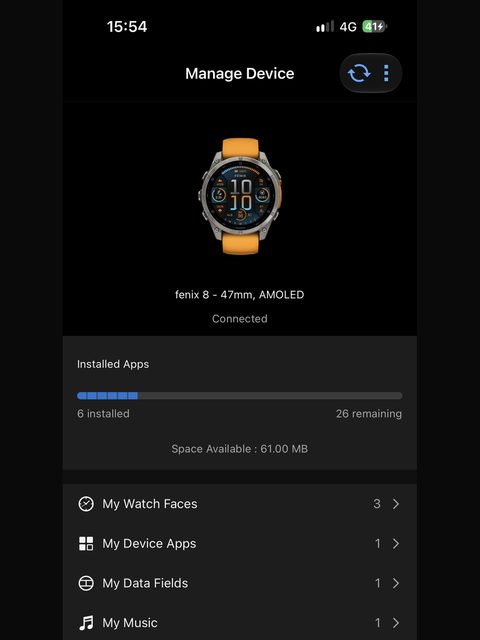
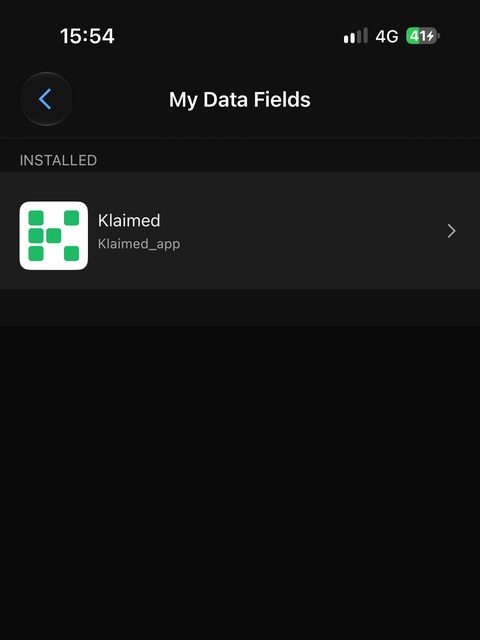
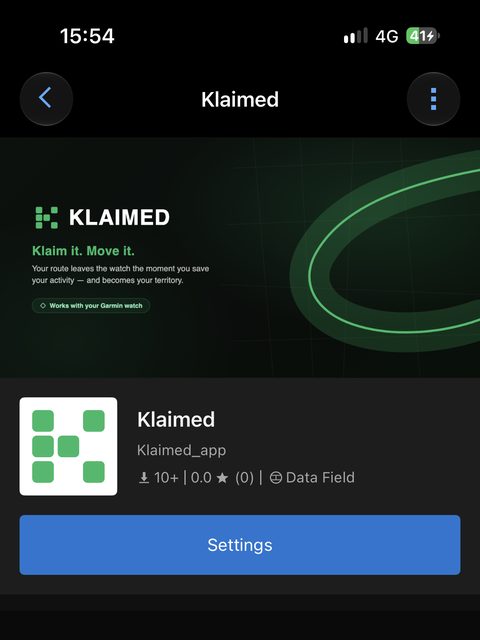
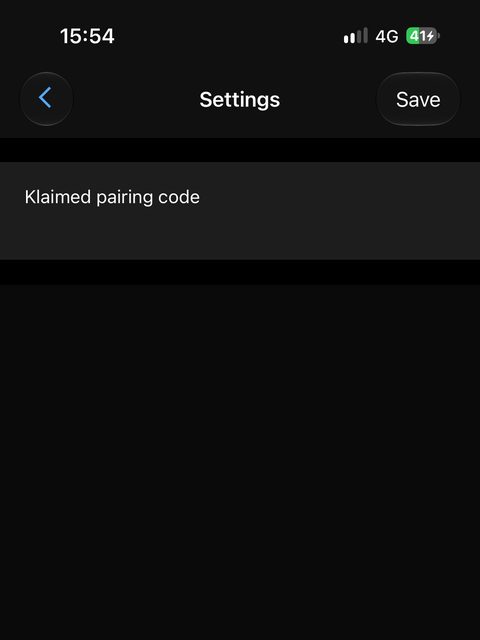
Step two is the one most often skipped: if you dismiss the prompt on your watch, the app looks installed but the data field was never added to any activity profile, and nothing gets recorded. If you missed it, add Klaimed manually on the watch under Settings → Activities & Apps → (your activity) → Data Screens.
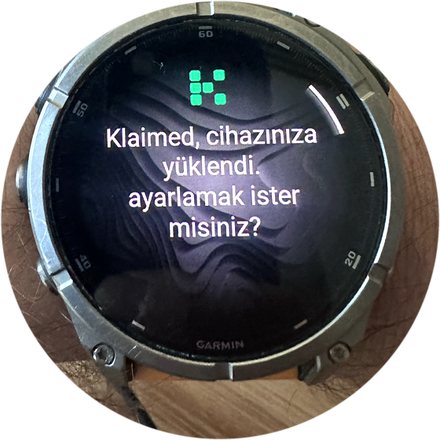
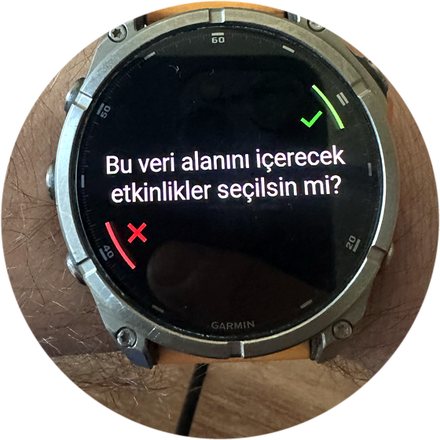
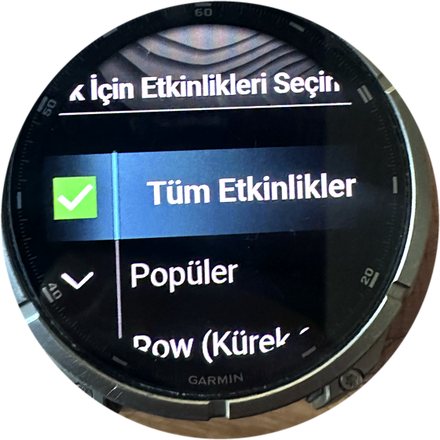
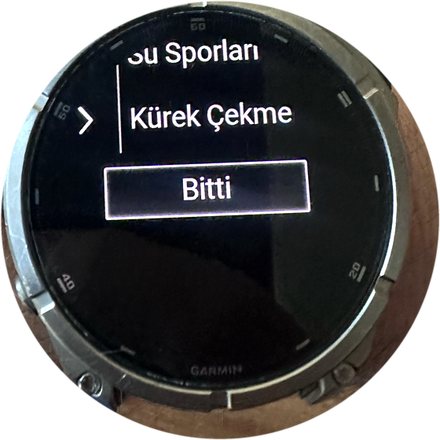
Photos from a real Garmin fenix 8. Wording may differ slightly on your watch model, but the flow is the same.
5. Android · Health Connect
On Android, data arrives through Health Connect, and the route permission is separate here too — on Android 14 and later it counts as a restricted permission and is asked for separately.
Check Health Connect permissions
- Settings → Security & privacy → Privacy → Health Connect
- App permissions → Klaimed
- Exercise, Distance and Exercise routes must be on
- The route permission may appear on its own screen — don’t dismiss it without allowing
If your watch’s data isn’t reaching Health Connect at all, first allow its maker’s app (Samsung Health, Garmin Connect, Polar Flow…) to write to Health Connect.
6. Still stuck
If you’ve tried the above and the activity still doesn’t arrive, write to us: info@klaimed.app
Including these makes it much faster: which watch or app you recorded with, the activity’s date and time, and whether the map is visible for that workout in your Health app.